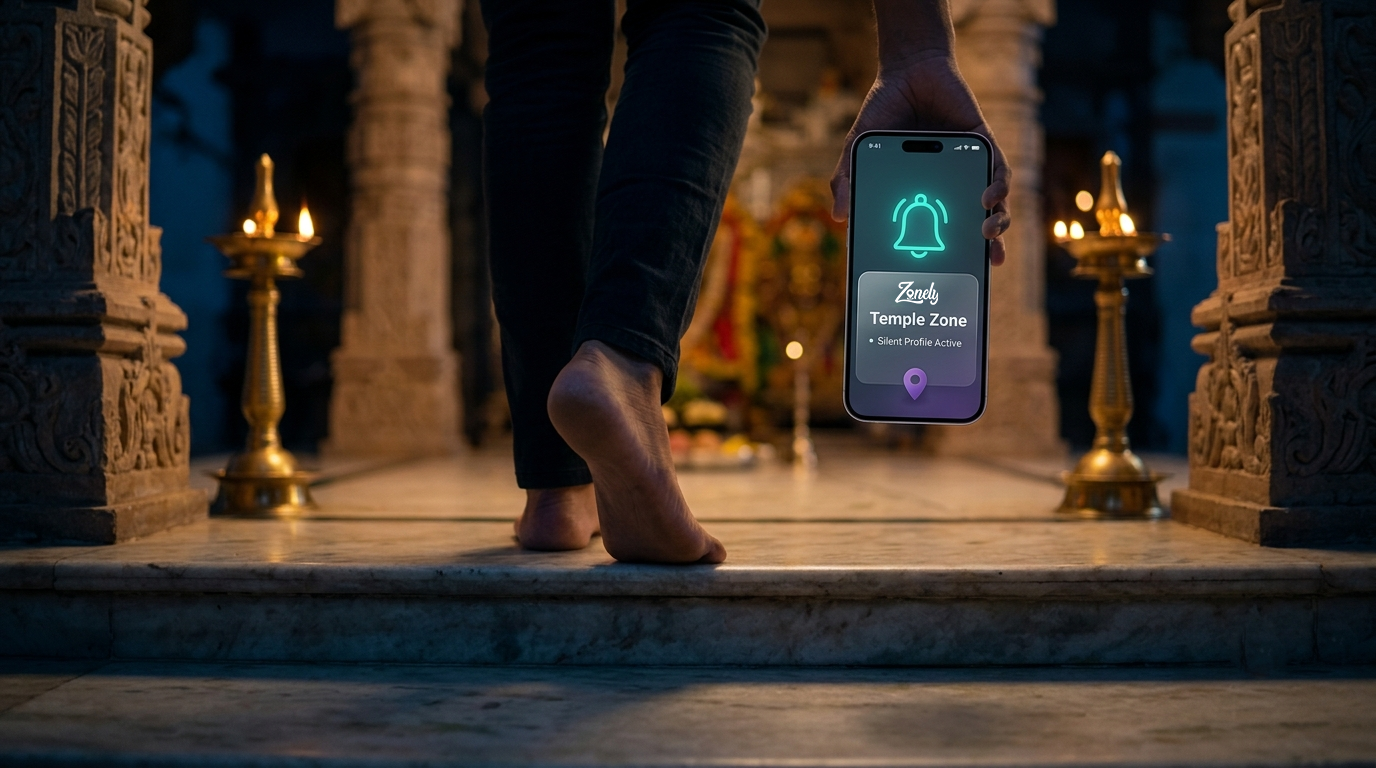
AutomateSilence.RespectYourFocus.
Zonely toggles your phone's volume, vibration and Do-Not-Disturb automatically when you enter geofenced zones or connect to your car's Bluetooth - all processed locally, zero cloud, zero battery drain.
100 % Offline Privacy
No account, no cloud, ever.
0 % Server Dependency
Runs entirely on-device.
1-Tap Zone Sharing
Instant deep-link fallback.
Core Capabilities
Everything you need to make your phone context-aware - without ever leaving your device.
Ambient Auto-Silencer.
Walk into a theater, temple, or hospital, and Zonely instantly drops your media volume to zero and silences your ringer. When you walk out, your volume bounces right back. It's like having a tiny, incredibly polite butler living in your device.
Sedentary Enforcer.
Haven't taken a step in an hour? Zonely will remind you to stretch. But because we aren't a nagging smartwatch, we check if you're on a VoIP call or in a meeting first. If you are, we silently defer the reminder by 15 minutes.
Nursery Mute.
Link Zonely to your nursery's Wi-Fi or your Bluetooth baby monitor. The second you step into the room, your phone goes completely silent. Zero location tracking, zero battery drain, and zero waking the baby.
Radio Killswitch.
Leave your house, and Zonely will gently prompt you to turn off your Wi-Fi and Bluetooth. No more draining your battery while your phone desperately searches for 'Starbucks_Guest' from the highway.
Automatic Living
The features that work so quietly, you'll forget they're there. Which is exactly the point.
It Knows You're Home Before You Do
Most location apps just poll your GPS on a loop, draining your battery to ask "are we there yet?" every few seconds. Zonely checks Wi-Fi first, then cell towers, then GPS only when it genuinely needs to - confirming you've actually arrived.
It Remembers Your Monday Better Than You Do
After a few weeks, Zonely quietly notices you're usually at the office by 9:05 on weekdays - and starts arming itself a few minutes early, so your phone goes silent the exact second you walk in.
It Learns Your Building's Wi-Fi
GPS struggles indoors. Once Zonely notices you're reliably connected to the same Wi-Fi or cell tower at a place you've saved, it'll offer to "anchor" that signal, making future arrivals near-instant.
A Gentle Nudge, Not a Bossy Override
Leaving home with Wi-Fi and Bluetooth still on, quietly draining your battery? Zonely notices and offers a one-tap shortcut to turn them off - it asks, it doesn't assume.
How It Works
Three simple steps to a phone that respects your space.
Mark Your Zone
Drop a pin or draw a polygon on the map - home, office, gym, mosque.
Pick a Profile
Choose Silent, Vibrate, Do-Not-Disturb or a custom volume preset.
Walk In, Relax
Zonely detects entry/exit instantly and applies the profile - no taps needed.
Privacy Policy & Policy Compliance
Effective Date: January 1, 2026
Zonely is built by people who got tired of their own phones interrupting them. This policy explains exactly what Zonely does with your data - in plain language, not legal fog.
1. What stays on your device
Zonely uses Android's Fused Location and Geofencing APIs to detect when you enter or leave the zones you set up, and automatically switches your phone's profile - Do Not Disturb, ringer volume, and related settings - in response. All zone coordinates, profile preferences, and checklist data are stored locally on your device in a Room database encrypted at rest with SQLCipher. This isn't a checkbox feature - the encryption key is generated and managed on-device, and a dedicated migration path upgrades any older, unencrypted installs automatically.
2. Background location
Zonely requests Background Location access so your automations keep working when the app is closed or your phone is in your pocket - that's the entire point of the feature. This data is processed in real time, on-device, and never used for advertising or behavioral tracking.
3. What does leave your device, and why
We believe in being straight about this rather than burying it. Zonely uses:
- Firebase Crashlytics and Firebase Analytics (Privacy Policy: policies.google.com/privacy) to catch bugs and understand basic app usage (how often features are used, not what your location data says about you). This is standard app-development tooling used by the vast majority of apps on the Play Store.
- MapTiler (Privacy Policy: maptiler.com/privacy) and LocationIQ (Privacy Policy: locationiq.com/privacy) to render maps and convert addresses to coordinates when you set up a new zone. This means your device exchanges the specific address or map area you're viewing with these services at that moment - it does not mean your ongoing location history is transmitted anywhere.
None of this data is sold. None of it is used for advertising. Your day-to-day zone triggers, arrivals, and departures are never sent anywhere - that processing genuinely happens entirely on your device.
4. SMS and Phone features
Zonely's Global SMS Engine can prepare an automatic text message when you arrive at or leave a zone - but due to Android's strict, sensible restrictions on apps sending SMS silently, Zonely never sends a message without you seeing it first. You'll get a notification with the message pre-filled in your default messaging app; you tap send. We think this is actually the right way to do it, permission restrictions aside - nobody wants an app that can text people on their behalf without a final look.
VIP Breakthrough lets specific contacts' calls ring through even when Do Not Disturb is active. This works by checking incoming call information against your chosen VIP list, entirely on your device - Zonely does not read your contacts, notifications, or messages to do this, and nothing about your contact list ever leaves your phone.
5. Your control
Every zone, checklist, and setting lives in your local database. Delete a zone anytime from within the app, or clear all Zonely data instantly via Android's own Settings → Apps → Zonely → Clear Storage.
Terms of Service
Effective Date: January 1, 2026
1. Acceptance of Terms
By downloading, installing, or using Zonely (the "App"), you agree to these Terms of Service. If you don't agree, please don't use the App.
2. Who Can Use Zonely
Zonely is intended solely for users who are 18 years of age or older. By using the App, you represent that you are at least 18. Due to the nature of Situational Escapes and Personal Safety tools designed for adult social contexts, the App is strictly not permitted for use by minors.
3. What Zonely Does
Zonely automates your phone's behavior - Do Not Disturb, ringer volume, and related settings - based on your physical location, using Android's Fused Location, Geofencing, Wi-Fi, and cellular signal APIs. Additional features (detailed below) extend this into departure reminders, social utilities, and personal safety tools. Full functionality depends on the Android permissions you grant - see our Privacy Policy for exactly what each permission is used for.
4. Subscription & Billing (Zonely Pro)
- Core automation features (Smart Geofencing, Departure Checklist, Stove & Lock Check, Radio Killswitch, Auto Anchor Learner) are free, permanently.
- Pro features (Situational Escapes, Night & Personal Safety tools, Predictive Pre-Arm) require a Zonely Pro subscription. Current pricing, trial lengths, and billing cycles are displayed clearly within the Google Play purchase flow prior to subscribing.
- Subscriptions are billed and managed through Google Play. Auto-renewal, cancellation, and refunds are governed by Google Play's subscription policies - we don't process payments or refunds directly.
- We'll provide reasonable notice before any price change takes effect for existing subscribers, as required by Google Play policy.
5. Permissions & Device Requirements
Some features require permissions beyond basic location access - Notifications, Phone State, Contacts, Bluetooth, and (for a small number of advanced features) elevated system-level access such as Device Administrator privileges. We request each of these only at the point a specific feature needs it, and each is explained in-app before you're asked to grant it. You can review and revoke any permission at any time through Android's Settings, though doing so may disable the corresponding feature.
6. Feature-Specific Terms
- Automation accuracy. Zonely's location detection relies on Wi-Fi, cellular signal, and GPS, in that order, to balance accuracy and battery life. Detection timing and accuracy can be affected by your device, your carrier, indoor environments, and manufacturer-specific battery optimization settings. We provide guidance for common devices, but can't guarantee identical performance across all Android hardware.
- Situational Escapes. Features like Fake Battery and Fake Shutdown are provided for your personal, lawful use in managing your own social situations. You're responsible for how and when you use them.
- Safety-related features - important. Wrong Direction Alert and Regret Shield are designed to add a helpful layer of awareness during a commute or a night out. They are not personal safety devices, emergency alert systems, or substitutes for calling local emergency services. Detection can be delayed, inaccurate, or fail entirely - due to GPS/network conditions, permission changes, battery optimization, or device-specific behavior. Do not rely on these features as your sole safety measure in any situation involving genuine risk to your wellbeing.
- VIP Breakthrough operates entirely on your device using standard phone-state APIs to identify incoming callers against a list you configure. We don't guarantee it will catch every call under every device condition, particularly if the relevant permission is later revoked.
- SMS features are designed to require your manual confirmation before any message is sent, by design and by Android policy. Zonely is not responsible for the content, delivery, or consequences of messages you choose to send.
- Advanced/experimental features. A small number of features may request elevated system permissions (such as Device Administrator access) to function. These features are more sensitive to device-specific and manufacturer-specific behavior than the rest of the App. We recommend reviewing in-app guidance carefully before enabling any feature in this category, and we provide a documented recovery path if a feature doesn't behave as expected.
7. Acceptable Use
You agree not to use Zonely to harass, deceive for harmful purposes, or violate the privacy or safety of others - including using Situational Escapes or similar features in ways intended to cause genuine harm rather than manage your own social situations.
8. Disclaimer of Warranties
Zonely is provided "as is" and "as available," without warranties of any kind, express or implied. We build every feature with genuine care and test extensively before release - but software behavior on Android depends on factors outside our control: your specific device model, manufacturer customizations (particularly aggressive battery management on brands like Xiaomi, Samsung, and OnePlus), network conditions, GPS availability, and how the Android OS itself schedules background tasks at any given moment. We do not warrant that any feature - including location detection, automated alerts, or safety-related notifications - will function without delay, error, or interruption on every device, every time.
9. Limitation of Liability
To the maximum extent permitted by applicable law, Zonely and its developers are not liable for any indirect, incidental, special, or consequential damages - including but not limited to a missed automation trigger, a delayed or failed notification, or any outcome resulting from a feature not behaving as expected - arising from circumstances outside our reasonable control, including device-specific behavior, OEM battery optimization, network or GPS conditions, or user configuration choices (such as disabling a required permission after enabling a feature).
This limitation applies with particular emphasis to Wrong Direction Alert, Regret Shield, and any other feature described as a safety or awareness aid - these are supplementary tools, not emergency systems, and are explicitly not a substitute for personal judgment, direct communication with people you trust, or contacting local emergency services. Nothing in this section limits liability that cannot be excluded under applicable law, including liability for gross negligence or willful misconduct.
10. Indemnification
You agree to indemnify, defend, and hold harmless Zonely and its developers from any claims, liabilities, damages, and legal costs arising from your misuse of the App, your violation of these Terms, or your violation of any rights of a third party.
11. Intellectual Property
Zonely's design, branding, and original code are the property of Zonely. Open-source components used within the App remain governed by their respective licenses.
12. Termination
We may suspend or terminate access to the App for violations of these Terms. You may stop using the App and uninstall it at any time.
13. Changes to These Terms
We may update these Terms as the App evolves. Material changes will be reflected here with an updated effective date; continued use after changes take effect constitutes acceptance.
14. Governing Law
These Terms are governed by the laws of India. You agree that the courts in Mumbai, Maharashtra, India shall have exclusive jurisdiction over any disputes arising from these Terms or your use of the App.
15. Contact
Questions about these Terms: appzonely@gmail.com
Google Play Data Safety Disclosures
Transparent overview of how Zonely handles device data for compliance audit readiness.
Android 14 & Play Store Compliance
Strict adherence to Data Safety and Foreground Service (FGS) policies.
Support & FAQs
Common questions and troubleshooting for your device.
Is Zonely safe to use? Does it track or sell my location data?
100% Local Storage. Your personal automations and zone locations are stored strictly on your device. We do not have any cloud servers for your personal data. Every single location you save, every setting you change, and every SMS you configure is stored locally in an encrypted database directly on your phone. We built Zonely for our own peace of mind, and your privacy is our absolute highest priority.
Will the app read my text messages or contacts?
No. The SMS and Contacts permissions are strictly used to send automated texts when you arrive at a zone, and to check incoming calls against your "VIP Breakthrough" list. Zonely cannot and does not read your personal inbox.
Does Zonely drain my battery?
No. Zonely is highly optimized and uses Android's built-in Geofencing API, which is designed to be incredibly battery efficient. Instead of constantly turning on your GPS, it relies on cell towers and Wi-Fi networks to determine your rough location.
What if a feature doesn't work exactly right on my phone?
We build and test every feature with real care, but Android is a genuinely fragmented platform - a feature that works flawlessly on one phone can behave differently on another, depending on the manufacturer, your battery settings, or even how strong your signal is that day. We're honest about this rather than pretending it doesn't happen: if something isn't working, tell us - appzonely@gmail.com - and we'll actually look into it. But we also want to be upfront that features like Wrong Direction Alert and Regret Shield are meant to be a helpful extra layer of awareness, not a replacement for your own judgment or for calling for real help when you need it.
Fixing App Kills (Device Specific)
Many phone manufacturers aggressively kill background apps to save battery, which will prevent Zonely from detecting your location. If Zonely stops working after a few hours, apply these settings:
Samsung
- Settings > Battery > Background usage limits
- Add Zonely to "Never sleeping apps".
Xiaomi / POCO (MIUI/HyperOS)
- Long press Zonely icon > App Info
- Enable "Autostart".
Oppo / OnePlus / Realme
- App Info > Battery usage
- Enable "Allow background activity" and "Allow auto-launch".
Vivo
- Settings > Battery > Background power consumption management
- Find Zonely and select "Don't restrict background power usage".
Need Assistance or Feedback?
Have questions regarding background permissions, setup guides, or feature requests? Reach out directly.
Contact Developer Support
Social Escape Hacks
Every utility app helps you do things. Ours also helps you leave things. Gracefully.
Sometimes You Just Need Your Phone to Look Dying
One tap from Quick Settings, and your phone convincingly limps to 1% - flickering warning screen and all. A completely legitimate reason to step away from any conversation.
Sometimes You Just Need Your Phone to Look Dead
For when "my battery's low" doesn't quite cover it. One tap, and your screen goes fully, convincingly black - powered off, apparently.